


LibreLinkUp
4.11.16K Reviews
App Specs
- Version
- 5.1.1
- Updated On
- License
- Free
- Downloads
- 1,000,000+
- Developer
- Newyu, Inc
- Categories
- Medical
- Platform
- Android, iOS
Screenshots
 Analysis by AppCompare
I see LibreLinkUp’s main value as shared visibility rather than a replacement for the person’s own glucose-management routine. It is a medical app from Newyu, Inc, built for people who want someone they trust to follow compatible continuous glucose monitor readings from a phone. That can be reassuring for a family member, but it also means the app makes the most sense when both the person wearing the sensor and the person following the readings understand what the information can—and cannot—do.
A companion view, not a second glucose monitor
The first distinction I would make is between the app used by the person wearing a compatible monitor and the companion view used by someone they invite. LibreLinkUp is aimed at the latter role: it lets a caregiver or relative keep up with shared readings, rather than turning an unrelated phone into a sensor reader. If you are choosing an app for your own day-to-day monitoring, check that your monitor’s primary app is the one you need; this companion app is useful alongside that arrangement, not as a stand-alone substitute for it.
That difference affects how I would set expectations with family. The person sharing readings remains the one managing their care, while a follower can notice a change and check in. It is not a reason to assume that another person is watching every moment, or that a phone notification will always be seen immediately. I would agree in advance on what a follower should do if an alert arrives, especially if the person wearing the sensor is away from home or unable to respond.
Where shared readings help in real life
Imagine a teenager at school or an older adult spending an afternoon alone. A parent or relative who has been invited to follow the readings can glance at the shared information instead of repeatedly calling to ask for an update. If something looks concerning, they can contact the person and offer practical help. The benefit is not that the app makes a decision for either person; it is that both can have a more informed conversation with less guesswork.
This can also make routine coordination easier. A caregiver might check a reading before calling, while the person wearing the sensor can explain what is happening in context. I would treat that context as essential: a graph or alert does not explain what the person has eaten, whether they are exercising, or how they feel. The app can support communication, but it cannot supply the full picture or replace advice from a healthcare professional.
There is a small but useful social detail here: sharing works best when it is agreed, not imposed. Before inviting someone, decide who actually needs access and what kind of check-in feels supportive rather than intrusive. For some people, sharing with one trusted relative is reassuring; for others, a wider circle could create pressure to explain every fluctuation. Keeping the audience intentional makes the information more useful and protects the person’s sense of independence.
Compatibility and setup deserve a careful check
Because LibreLinkUp depends on a compatible continuous glucose monitor and on readings being shared from the appropriate setup, I would check the current device and app requirements before relying on it. The companion app is not a way to connect any glucose sensor you happen to own. Compatibility is the first practical question to settle, and it is better to confirm it before a caregiver depends on access for a particular routine.
Worth Reading Before You Choose

Flipboard Shows What News Apps Must Do Beyond the Feed

Switching to Android Auto Means Rethinking Your Driving Routine

Google Calendar Makes a Crowded Week Easier to Manage

Ludo King Makes the Most of the Minutes Between Plans

Baby Panda World Brings Quick Play to Modern Phones, but Its Game Library Feels Busy

ESPN’s Live Game View Makes Following Close Games Easier
Once the sharing relationship is in place, it is worth checking that the intended follower can see the information and understands the alerts. A quick test together can reveal simple problems, such as an invitation going to the wrong person or a notification being overlooked. I would also make sure each person knows which phone to use and how to contact the other directly; the app should be one route for awareness, not the only communication plan.
How it compares with keeping readings private
The usual alternative is for the person wearing the monitor to review readings themselves and share updates verbally, perhaps during a call or appointment. That approach gives the user more privacy and avoids asking anyone else to keep watch, but it can be less convenient when a caregiver needs timely awareness. LibreLinkUp’s strength is that it reduces the need for repeated manual updates, provided the user is comfortable sharing and the follower is prepared to use the information responsibly.
It is not automatically better than a paper log or a conversation with a clinician. A log can be useful when someone wants to reflect on events and bring a concise record to an appointment, while a clinician can interpret patterns in light of treatment and medical history. A companion view serves a different purpose: keeping a trusted person informed between those conversations. I would choose based on the job at hand rather than expecting one tool to cover monitoring, record-keeping, and clinical guidance all at once.
Who should consider it—and who may not need it
I think the app is most worthwhile for someone who already uses a compatible monitor and wants a specific caregiver or family member to follow shared readings. It may be especially helpful when distance, school, work, or living arrangements make frequent in-person check-ins impractical. A caregiver who wants a clearer view of what is happening between conversations may also find it less stressful than relying on memory alone.
On the other hand, if you do not use a compatible monitor, want to keep glucose information private, or are looking for a full diabetes-management platform with broader tools, this may not be the right fit. Someone who only needs to review their own readings should first look at the primary app intended for their monitor. And if a follower would react anxiously to every change or treat alerts as instructions, it may be better to agree on boundaries before sharing—or to keep the information within the person’s own care routine.
LibreLinkUp is free, has an Everyone age rating, and has reached over a million installs. Its average rating is 4.3 from around 39,000 ratings, with roughly 1,100 written reviews. It was released in July 2019, and version 5.0.1 requires Android 11 or later. Those figures suggest it has found a substantial audience, but they do not answer the most important personal question: whether your monitor, phone, and sharing arrangement suit the way you manage care.
Ever wondered if there’s an app that makes managing diabetes a bit less of a hassle? Well, let me introduce you to LibreLinkUp, an app that’s been making waves in the health tech community. As someone who's spent quite a bit of time exploring apps, this one caught my eye for its unique approach to managing glucose levels.
What is LibreLinkUp?
At its core, LibreLinkUp is designed to work seamlessly with the FreeStyle Libre sensor, allowing users to monitor glucose levels from their smartphone. This means no more constant finger pricks, which is a huge relief for many. Instead, you get continual updates on glucose readings that can be shared with caregivers or family members. It’s like having a mini health guardian in your pocket!
Setting Up and Getting Started
Getting started with LibreLinkUp is pretty straightforward. Once you’ve got the FreeStyle Libre sensor on board, downloading the app and linking it up is a piece of cake. The interface is user-friendly, guiding you through the setup process without any hiccups. I had it up and running in under 10 minutes, which is pretty impressive.
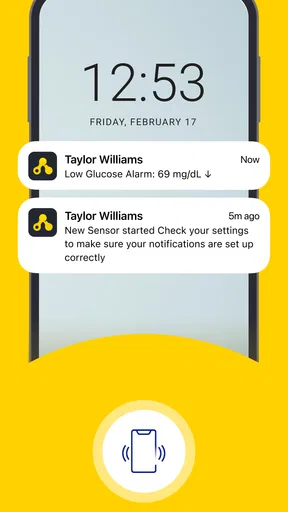
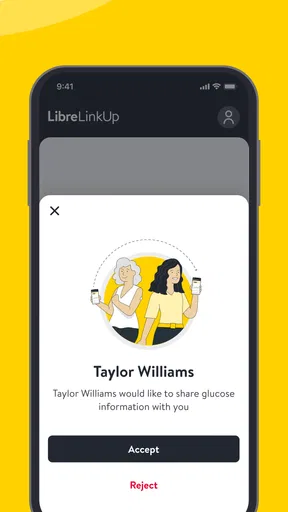
What’s really neat is how you can invite others to view your glucose data. This is super handy if you have a family member who wants to keep an eye on your readings or if your healthcare provider needs access. They receive notifications whenever your glucose levels go too high or too low, so it’s like having a second set of eyes.
Features That Stand Out
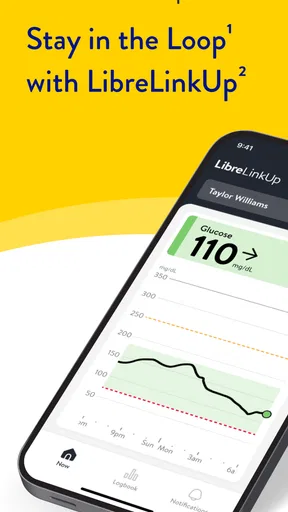
One of the standout features is the real-time glucose monitoring. The app provides updates every 15 minutes, which is crucial for those who need to make immediate dietary or medication adjustments. It’s like having your own personal glucose coach.
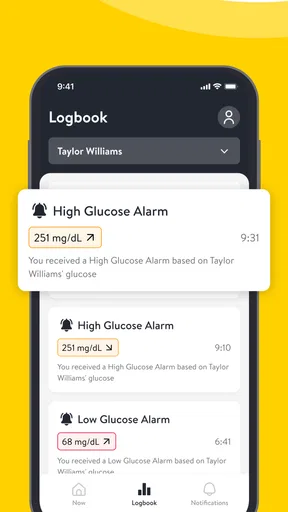
Another feature I love is the ability to track trends over time. The app provides detailed graphs that show your glucose levels throughout the day. It's super insightful and helps you identify patterns or triggers that might affect your levels. Plus, the app keeps a history of your data, so you can easily share it with your doctor during appointments.
User Experience and Interface
The user interface is sleek and intuitive. It’s clear that the developers focused on making the app as easy to navigate as possible. The dashboard gives you a quick overview of your glucose status, with color-coded indicators to show if you're in a safe range or need to take action.
Notifications are non-intrusive yet effective. You get alerts that are easy to understand, and they don’t clutter your phone’s notification center. It’s all about keeping you informed without overwhelming you, which I really appreciate.
Room for Improvement
While LibreLinkUp is pretty stellar, there’s always room for improvement. One thing I noticed is that the app could benefit from more detailed customization options for alerts. Sometimes, you might want to set different thresholds depending on the time of day or your activity level, and having more flexibility here would be a plus.
Also, while the app is great for sharing data, it would be even better if it integrated with more health apps or platforms. Imagine syncing your glucose data with a fitness tracker or dietary app. That kind of integration could provide a more holistic view of your health.
The Final Verdict
So, what’s the final word on LibreLinkUp? If you or a loved one is managing diabetes, this app is definitely worth checking out. It simplifies glucose monitoring and makes sharing data with others a breeze. While it’s not perfect, the pros far outweigh the cons, and it’s a tool that can truly make a difference in daily diabetes management.
In conclusion, LibreLinkUp is more than just an app; it’s a companion that helps you stay on top of your health in an innovative and user-friendly way. Whether you’re tech-savvy or not, you’ll find this app easy to use and incredibly beneficial.
Making the sharing routine work
One practical way to get more value from shared readings is to establish a simple routine rather than expecting a caregiver to monitor the screen constantly. For example, agree that a relative will check in at a particular point in the day, while urgent concerns are handled through a direct call or the person’s usual care plan. That keeps the app from becoming a source of constant surveillance and makes its role easier to understand.
I would also encourage the person sharing data to explain what a normal day can look like for them. A follower who has never seen glucose trends may interpret every rise or dip as an emergency. A short conversation about when to ask a question, when to wait, and when to use the agreed contact method can prevent unnecessary worry. The app offers visibility; the relationship still needs clear expectations.
Questions to settle before depending on alerts
Can a caregiver rely on a notification as proof that everything is fine? I would not. Notifications are helpful prompts, not a guarantee that someone has seen a change or that the person wearing the sensor is safe. Phone settings, connectivity, and everyday distractions can all affect whether an alert gets noticed, so keep a direct way to reach each other and follow the care instructions provided by the person’s clinical team.
Does sharing mean a relative can manage treatment remotely? No: seeing readings does not give a follower the context or authority to make treatment decisions. The person’s established plan and professional guidance should remain the basis for those choices. A caregiver can offer support, ask whether help is needed, or contact the person, but the app should not turn them into an informal clinician.
Can the app replace appointments or a careful conversation about patterns? I would not use it that way. The history and graphs may help someone discuss observations with a healthcare professional, but interpretation belongs in the wider context of symptoms, routine, and care. It can make a conversation easier to prepare for, not make that conversation unnecessary.
A more measured recommendation
The strongest reason to try LibreLinkUp is quite specific: a person using a compatible monitor wants a trusted other person to have a shared view without relying on constant calls or manually repeated updates. In that situation, the companion role is clear and genuinely useful. The weaker case is downloading it simply because diabetes apps sound helpful; without a compatible setup and a willing sharing arrangement, its central benefit is not available.
I would recommend discussing the boundaries first, checking compatibility, and then seeing whether the shared view actually reduces friction in daily life. If it creates more checking, anxiety, or misunderstandings than reassurance, scaling back access may be the better choice. Used thoughtfully, this is a practical support tool—not a substitute for personal judgement, medical care, or direct communication.
Pros
- Easy glucose monitoring for friends/family.
- Real-time alerts on glucose changes.
- User-friendly interface enhances experience.
- Customizable notifications for flexibility.
- Secure data sharing with encryption.
Cons
- Requires stable internet for real-time alerts.
- Limited to compatible glucose sensors.
- May drain battery with frequent alerts.
- Notifications can be overwhelming at times.
- Initial setup might be confusing for some.
FAQs for LibreLinkUp
What is LibreLinkUp and how does it work?
LibreLinkUp is a companion app designed to help users monitor glucose levels remotely. It connects with the FreeStyle Libre sensors, allowing caregivers and family members to receive real-time glucose readings and trends directly to their smartphones. The app provides insights into glucose patterns, making it easier to manage diabetes effectively.
Is LibreLinkUp available for both Android and iOS devices?
Yes, LibreLinkUp is compatible with both Android and iOS devices. Users can download the app from the Google Play Store or the Apple App Store. The app supports a wide range of smartphones, but it’s always good to check the specific device compatibility on the app’s download page before installing.
How secure is the data shared on LibreLinkUp?
Data security is a primary concern for LibreLinkUp. The app uses encryption to protect all data transmissions. Users have control over who can access their glucose readings, and the app complies with privacy regulations to ensure that personal health information is handled with the utmost care and confidentiality.
Can multiple caregivers receive updates from a single Libre sensor?
Yes, LibreLinkUp allows multiple caregivers to receive real-time updates from a single FreeStyle Libre sensor. This feature is particularly useful for individuals who require monitoring from several family members or healthcare providers. Each user must have the app installed and be granted permission by the primary user.
Are there any costs associated with using LibreLinkUp?
The LibreLinkUp app itself is free to download and use. However, users need to have a FreeStyle Libre sensor, which may incur costs depending on insurance coverage or out-of-pocket expenses. It’s recommended to check with healthcare providers or insurance companies for detailed cost information.


